On-Premise AI, Installed on a Server You Own
Your files are the reason clients trust your firm. Most AI tools ask you to send those files to someone else’s servers. I do the opposite: I put the AI next to the files, on a server in your office, running open models on hardware you own. Nothing leaves the building.
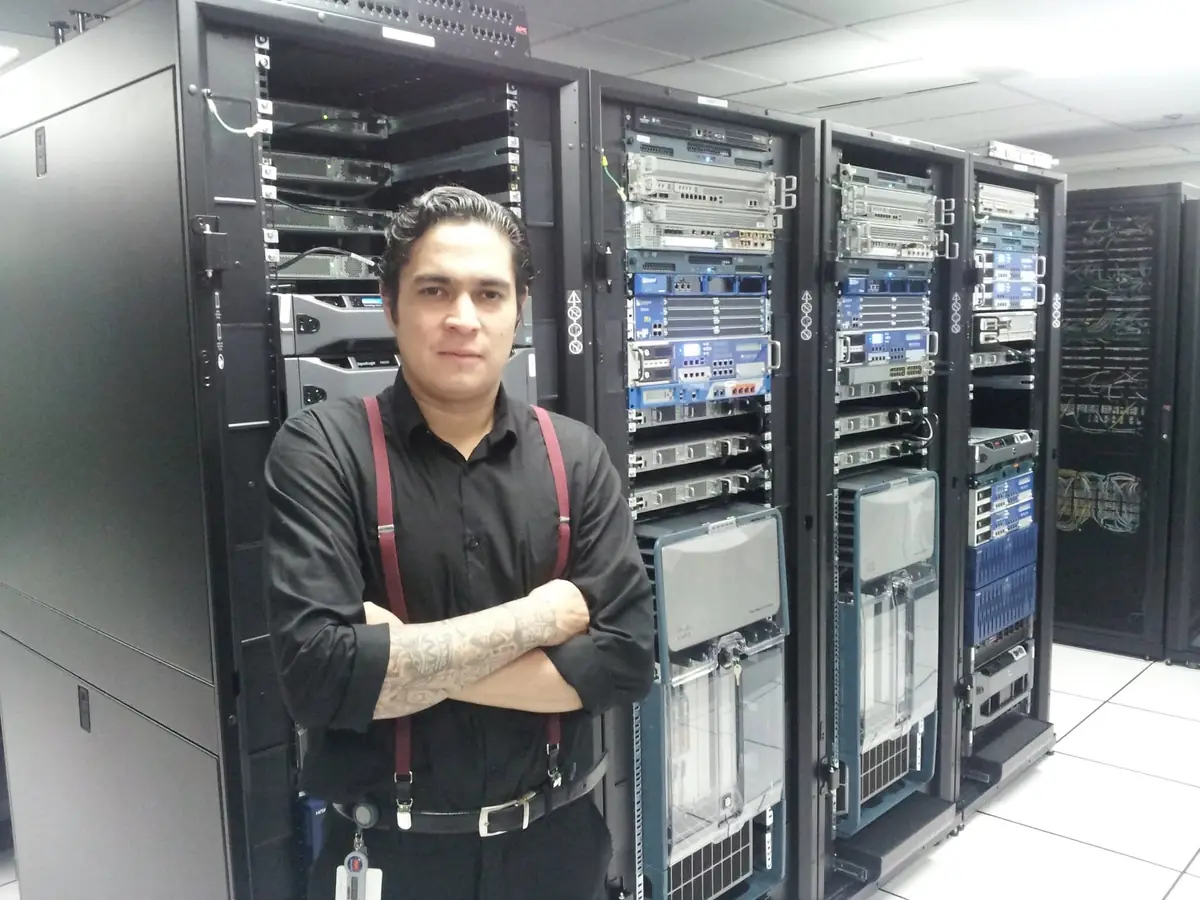
15 years in server rooms, before AI
I’ve been building on the internet since 1998, and for 15 years I worked in infrastructure: enterprise and government systems, the kind nobody notices until they fail.
In 2014 and 2015, at Toronto Hydro, I managed a multimillion-dollar datacenter migration from start to finish: VMware clusters, storage area networks and middleware. From 2015 to 2017, at the Ontario Public Service, I deployed middleware on UNIX. I’m a VMware Certified Professional.
Today I build WebCore, an AI platform for small businesses, and I’m moving WebCore’s own AI agent onto a server in our office, set up the same way I’d set up yours. When I talk about racks, power, networks and Linux, it’s because I’ve stood in front of them.
Why on-premise AI is the security-first choice for a law firm
A lawyer in Ontario has to hold in strict confidence everything learned about a client’s affairs. That’s Rule 3.3-1 of the Rules of Professional Conduct, and it doesn’t pause for new technology.
In April 2024 the Law Society of Ontario published a white paper on licensees’ use of generative AI. It names the unanticipated spread of confidential information as one of the main risks, and asks firms to understand how a tool handles what you type into it before you trust it with client information.
With a cloud tool, answering that means reading terms of service and trusting they hold. So on-premise AI makes the answer short: the information goes nowhere. The model is on your server, behind your firewall, and it has no line to the outside.
Cloud AI tools and on-premise AI, side by side
| A cloud AI tool | On-premise AI | |
|---|---|---|
| Where your files go | To the vendor’s servers, wherever they run them | Nowhere: they stay on your server, in your office |
| Who can see prompts and answers | Depends on the vendor’s terms, which can change | Only the people you give an account to |
| Training on your data | Off by default on some plans, on by default on others | It can’t happen: the model never phones home |
| When the internet is down | Nothing works | It keeps working on your own network |
| What a client hears when they ask | “Let me check the vendor’s policy” | “It never leaves our building” |
How it works, inside your building
Everything in the box below sits in your office. The only line that crosses the wall is the one you already have for email and the web, and the AI doesn’t use it.
Your office · your network · your firewall
Your team
Lawyers and staff open it in a browser, on the office network or your VPN.
Sign-in and permissions
Each person has an account. Who can see which folders follows the rules you set.
The AI server
Bare metal, or a virtual machine on a host you already run. Linux, with:
- An open model, running locally
- An index of the folders you choose
- A log of who asked what, and when
Already running your own servers?
Many firms do. If you run VMware, Hyper-V or Proxmox, the AI can live as one more virtual machine on your host, with a graphics card passed through to it where your hardware supports it. Your backups, monitoring and firewall rules already cover it.
Starting from nothing?
Then I install a dedicated machine: a GPU workstation for a small office, or a rack server for a bigger one, sized to the work you want it to do. It goes on your network, behind your firewall, and it’s yours.
What your firm can do with it
Ask your own files
Search years of agreements, memos and precedents in plain English, and get an answer that names the document it came from, so a lawyer can check it in seconds.
First drafts from your templates
Engagement letters, routine correspondence and standard clauses, drafted from the firm’s own precedents instead of the internet’s.
Summaries of long documents
Transcripts, disclosure and long contracts boiled down to the points that matter, with the page references kept.
Intake and notes
Turn a new client’s emails and call notes into a clean summary for the file, without pasting anything into a public chatbot.
It doesn’t replace a lawyer’s judgment. It finds, drafts and summarizes; a person checks and signs. That’s also what the Law Society expects under Rule 6.1-1: you supervise the tools your firm uses.
From the first call to a working server
1. A call, then a visit
What you run today, where it lives, your power and network, and which documents the AI should read. You get a fixed quote.
2. The install, on site
I set up the server or the virtual machine, Linux, the model and the document index, in your office, anywhere in Ontario.
3. Locked down and tested
Firewall rules, accounts, permissions, logs and backups, then a test with your team on your own documents.
4. Yours, and looked after
You own all of it. I keep it updated and backed up on a schedule you approve, and your IT team can take it over whenever you like.
On site, anywhere in Ontario
I’m based in Cambridge, Ontario, and I install in person across the province: Toronto and the GTA, Kitchener-Waterloo, Hamilton, London, Ottawa and the towns between. But on-premise means someone has to come to the premises, so that’s part of the job.
On-premise AI: questions firms ask
What is on-premise AI?
On-premise AI is an AI model that runs on hardware in your own office, instead of on a provider’s servers. Your staff use it in a browser, like any chat tool, but the prompts, the answers and the documents it reads never leave your network.
Does any of our data leave the office?
No: the model, your documents and the conversation history all live on the server in your building. The server has no outbound connection to an AI provider. When software updates are needed, I download and check them, and they are installed on a schedule you approve.
Can it run on servers we already own?
Often, yes. If you run VMware, Hyper-V or Proxmox, the AI can run as a virtual machine on your host, with a graphics card passed through to it where your hardware supports it. If your servers can’t take it, I install a dedicated server next to them.
Which AI models does it use?
Open-weight models, such as Llama, Mistral or Qwen, that you are allowed to run on your own hardware. I pick the model and its size for the work you want it to do and the hardware you have, and it can be swapped later as better models come out.
Is it as good as ChatGPT?
For searching and summarizing your own documents and drafting from your templates, open models running locally do the job well. For the hardest general questions, the biggest cloud models are still ahead. The trade is deliberate: you give up a little of the frontier to keep every file in the building.
How does this fit the Law Society of Ontario’s guidance?
I’m not a lawyer and this isn’t legal advice. The Law Society’s 2024 white paper on generative AI asks licensees to understand where their inputs go and to keep confidential information out of tools without adequate security. Running the model on your own server takes the outside provider out of that question. Your firm still sets the policy and supervises the work.
What does it cost?
It depends on the hardware: a virtual machine on a server you already own costs far less than a new GPU server. After an assessment you get a fixed quote for the setup. There is no per-message fee for using the model, because it runs on your own machine.
Who maintains it, and what if we want to take it in-house?
I do: updates, backups and health checks on a schedule you approve. You own the hardware, the software and the data from day one, and your own IT team can take it over at any point. Everything is documented.
Want this in your office?
Pick a time on my calendar, or tell me a little about your firm and what you run today. I’ll reply myself.
Book a call